

Automated Native View Timers (Performance Timing)
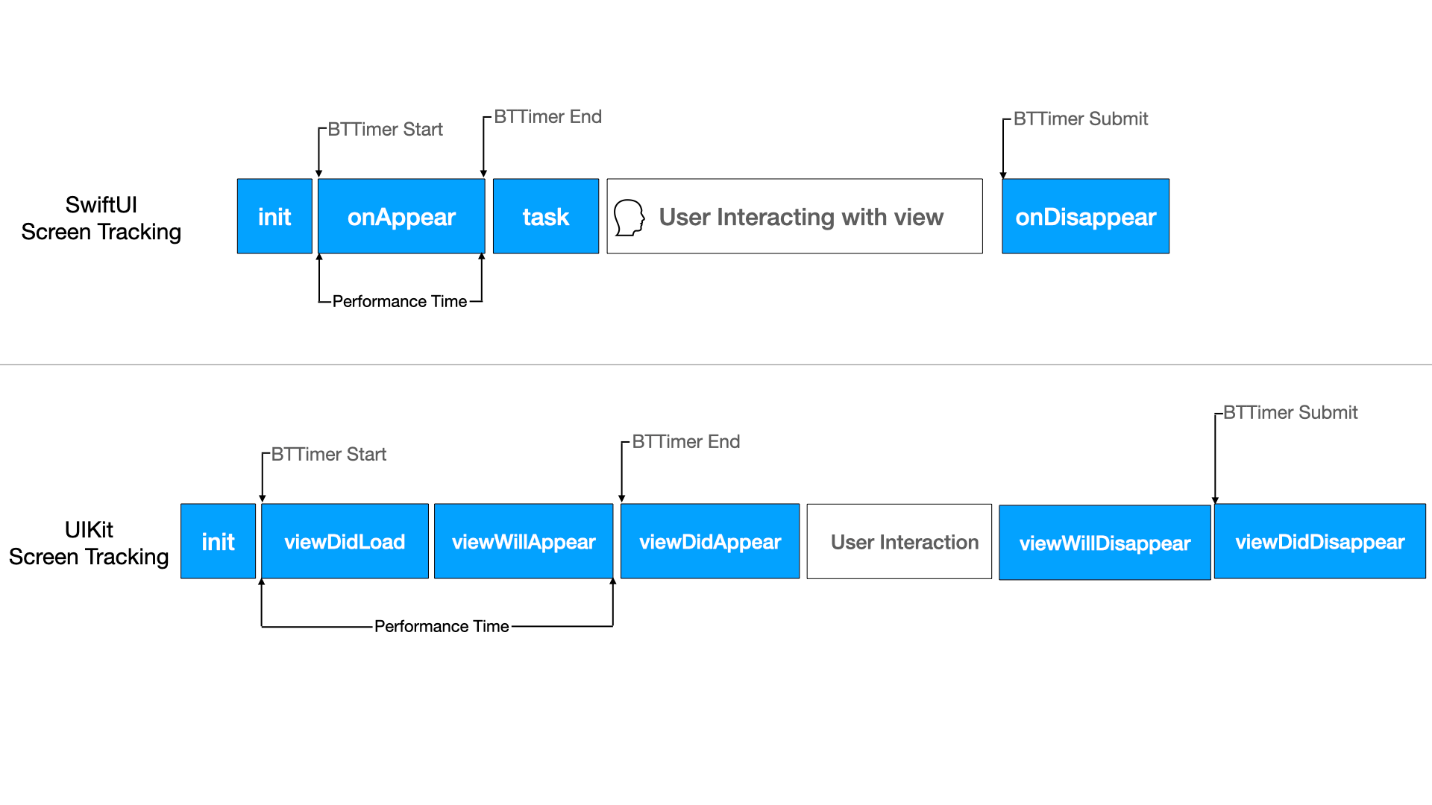
The Blue Triangle SDK automatically sets up timers to measure the appearance of Native Views in the Mobile app:
Session Management
What is a Session?
A session is used to group collected user data over a period of time. Each session has a unique Session ID. Sessions expire after 30 minutes of inactivity, with inactivity being defined as the period during which the user is not actively engaging with the app. This period of inactivity starts when the user goes offscreen and ends when the user relaunches the app.
There can be multiple offscreen user scenarios:
-
The user killed the app
-
The system killed the app
-
The device rebooted
-
The user puts the app in background (for example, by tapping the home button)
-
The user received a phone call
-
The user locked the device screen
Privacy Manifest
It is the application developer's responsibility to ensure that the privacy nutrition labels are used according to the configuration and usage of the BlueTriangle SDK in your application. For instance, if your application uses revenue tracking, then it is the application developer's responsibility to mention Purchase History in their application's Privacy Manifest data usage.
Depending on how App developers are utilizing the BlueTriangle SDK's configurable features, it is their responsibility to accurately mention their apps data uses in the Privacy Manifest. The table below shows each BlueTriangle feature and their applicable data nutrition label data type:
|
# |
DATA TYPE |
LINKED |
TRACKING |
PURPOSE |
BTT Feature |
|---|---|---|---|---|---|
|
1. |
Purchase history |
NO |
NO |
Analytics |
if app using cartValue(PurchaseConfirmation) to our timer. |
|
2. |
Product interaction |
NO |
NO |
App Functionality |
if app using timers to track user action like button tap. |
|
3. |
Crash data |
NO |
NO |
App Functionality |
if app using crash tracking feature of Blue Triangle SDK. |
|
4. |
Performance data |
NO |
NO |
App Functionality |
if app using performance data(memory and CPU) and ANR feature of Blue Triangle SDK. |
|
5. |
Other diagnostic data |
NO |
NO |
App Functionality |
if app using any of the feature like timer and mobile view tracking etc. |
For details about data usage check documentation here.